Skip to content

Cart

Your cart is empty

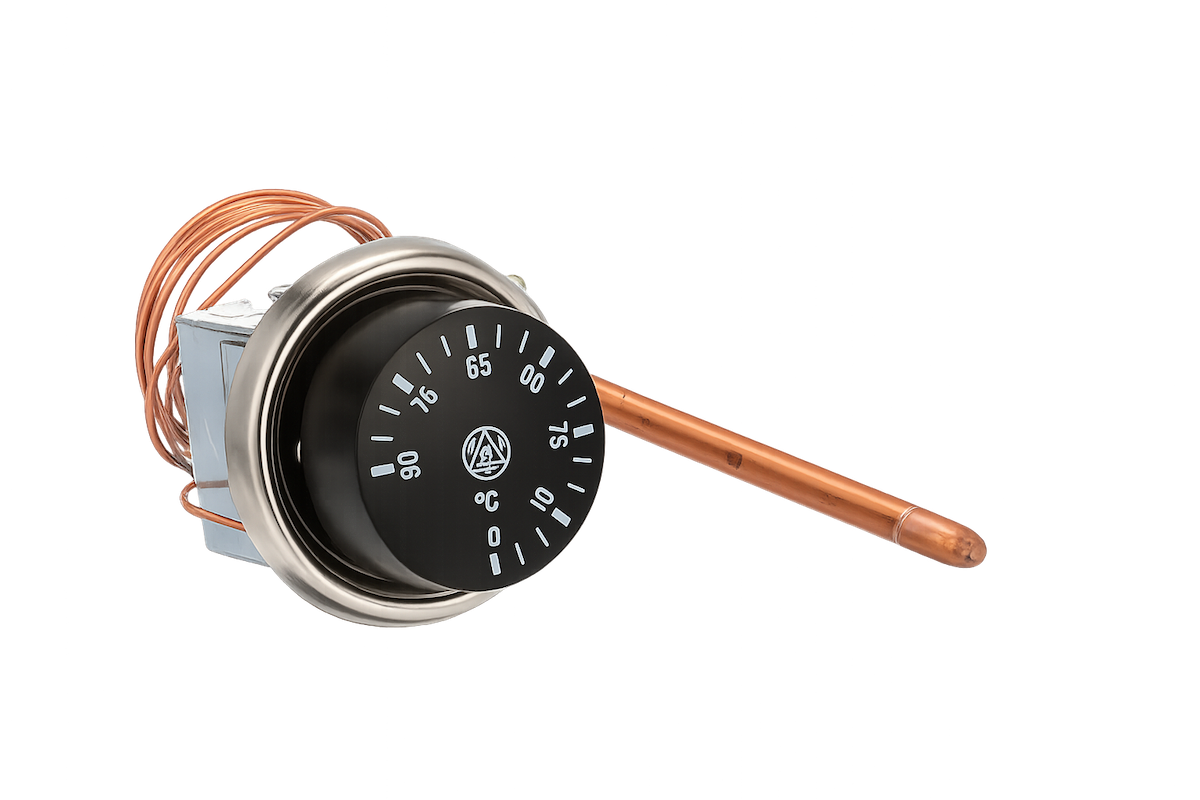
Adjustable Capillary Thermostat (0–90°C / 32–194°F) for Durvela Solar Aeration Fan System

Sale price$120.00

Automatic Temperature Control for Your Compost Aeration System

The Adjustable Capillary Thermostat automatically turns the Durvela Solar Aeration Fan System on and off based on the temperature inside your compost. By sensing compost temperature through the Durvela Stainless Steel Thermowell, the thermostat helps deliver airflow only when it is needed, improving composting efficiency while reducing unnecessary fan operation.

The thermostat features an adjustable temperature range from 0 to 90°C (32 to 194°F), allowing users to select the ideal fan activation temperature for their composting conditions. A remote sensing bulb connected by a 1 metre capillary tube provides accurate temperature measurement while keeping the electrical controls safely outside the composting environment. The thermostat uses SPDT contacts and is rated for up to 16A at 250 VAC


Designed for the Durvela Solar Aeration System

The sensing bulb installs inside the Durvela Stainless Steel Thermowell, while the capillary tube is protected inside the 10mm Nylon Air Line Tubing and sealed using the Remke 106 Cord Grip. This creates a durable, weather-resistant installation suitable for long-term outdoor use.

  • Automatically switches the aeration fan on and off based on compost temperature
  • Adjustable operating range from 0–90°C (32–194°F)
  • Remote sensing bulb provides accurate compost temperature measurement
  • Helps optimize oxygen delivery during active composting
  • Reduces unnecessary fan operation and extends component life
  • Ideal for insulated composters and active aeration systems

Features

  • Adjustable temperature range: 0–90°C (32–194°F)
  • SPDT switching contacts
  • 16A contact rating
  • 250 VAC switching capacity
  • Automatic reset operation
  • 1 metre capillary tube with remote sensing bulb
  • Panel-mount design with adjustment knob
  • Suitable for heating or cooling control applications

Compatible Products


Typical Applications

  • Active compost aeration systems
  • Commercial composters
  • Garden composting equipment
  • Agricultural ventilation control
  • Temperature-controlled fan systems

What's Included

  • 1 × Adjustable Capillary Thermostat
  • Adjustment knob
  • Mounting bezel

Thermowell, solar aeration fan, cord grip and protective nylon tubing are sold separately.

Adjustable Capillary Thermostat (0–90°C / 32–194°F) for Durvela Solar Aeration Fan System
Adjustable Capillary Thermostat (0–90°C / 32–194°F) for Durvela Solar Aeration Fan System Sale price$120.00

Product details and compatibility

Confirm fit before ordering
  • Designed for the Durvela Solar Aeration Fan System.
  • Compatible with the Durvela 12 VDC, 6 W aeration fan.
  • Controls fan operation from either the solar panel or DC backup adapter.
  • Compatible with the maintained SOLAR/OFF/ADAPTER selector-switch circuit.
  • Intended for installation inside the Durvela solar aeration fan enclosure.
  • Replaces the original adjustable capillary thermostat used in the Durvela system.
  • Not intended for AC mains wiring or unrelated heating and cooling equipment.
Technical highlights
  • Adjustable temperature range from 0°C to 90°C (32°F to 194°F).
  • Automatically starts the aeration fan when the selected temperature is reached.
  • Mechanical capillary sensing requires no separate electrical power.
  • Remote sensing bulb measures temperature away from the thermostat body.
  • SPDT switching contacts with COM, NO and NC terminals.
  • Supports both solar and DC backup operation.
  • Simple mechanical adjustment without programming or electronics.
  • Designed for reliable low-voltage fan control.
  • Replaceable and serviceable using standard terminal connections.
Technical specifications
  • Product type: Adjustable mechanical capillary thermostat
  • Temperature range: 0°C to 90°C
  • Fahrenheit range: 32°F to 194°F
  • Sensing method: Liquid-expansion capillary bulb
  • Contact configuration: SPDT
  • Contact terminals: COM, normally open (NO) and normally closed (NC)
  • Durvela control connection: COM to NO
  • Control action: COM-to-NO closes on temperature rise in the Durvela wiring configuration
  • System voltage: 12 VDC
  • Controlled load: Durvela 12 VDC, 6 W brushless aeration fan
  • Normal fan current: Approximately 0.5 A
  • Adjustment method: Manual temperature-control dial
  • Electrical power required for sensing: None
  • Installation location: Inside the solar aeration fan enclosure
  • Fan negative connection: Direct common-negative return; not switched by the thermostat
  • Intended service: Low-voltage temperature-controlled ventilation
Installation and use
  1. Move the source selector to OFF.
  2. Unplug the DC backup adapter.
  3. Disconnect or completely cover the solar panel.
  4. Photograph and label the existing thermostat connections before removing any wires.
  5. Mount the replacement thermostat in the original enclosure location using the supplied mounting hardware.
  6. Route the capillary tube carefully without kinking, crushing, cutting or sharply bending it (wet hose with a mild detergent in water to help lubricate it if the bulb is difficult to insert) .
  7. Position the sensing bulb in the original sensing location or thermowell, if fitted. 
  8. Connect the selector’s COMMON output wire to the thermostat COM terminal.
  9. Connect the thermostat NO terminal to the fan-positive wire.
  10. Leave the NC terminal unused and individually insulated.
  11. Keep the fan, solar-panel and DC-adapter negatives connected to the separate common-negative return.
  12. Reinstall all enclosure covers, gaskets and seals before restoring power.
  13. Test operation using both the SOLAR and ADAPTER selector positions.

Turn the temperature dial toward a higher setting to delay fan operation. Turn it toward a lower setting to make the fan operate at a lower sensed temperature.

Downloads and documentation
Important notes
  • Disconnect both the solar panel and DC adapter before opening the enclosure or servicing the thermostat.
  • The thermostat is a dry-contact mechanical switch; it does not generate or regulate the 12 VDC supply.
  • The Durvela system uses the COM and NO contacts so the fan turns on as temperature rises.
  • The NC terminal is not used and must remain individually insulated.
  • Do not route the negative return through the thermostat.
  • Never cut, puncture, crush or tightly bend the capillary tube or sensing bulb. The capillary system is sealed and cannot be repaired if damaged.
  • Avoid placing the capillary tube against sharp edges, hot surfaces or moving components.
  • Temperature markings are approximate. Mechanical thermostats normally have operating tolerance and switching differential.
  • Test the fan at the intended temperature setting before returning the system to service.
  • Use only with the Durvela low-voltage fan circuit unless the thermostat’s contact rating has been independently confirmed for another load.
  • Do not connect this thermostat directly to AC mains voltage.
Durvela product support Contact Durvela for help confirming compatibility, selecting a replacement part, or installing this product.